Work — Bao To
Every project by Bao To, a design engineer and studio artist in New York: AI-era product work, design systems, and full-stack builds, filterable by kind. Each entry opens a case study.
Every project by Bao To, a design engineer and studio artist in New York: AI-era product work, design systems, and full-stack builds, filterable by kind. Each entry opens a case study.
Designing a Graph-RAG LLM-based notetaking workflow.
NOTETAKINGLM CASE STUDY
Product Designer
Full-stack Engineer
October 2024 - December 2024
Figma
UI/UX
User Research
Productivity Software
AI Interface
Personal Project
PROJECT OVERVIEW
I propose the core UI & UX for a new context-based AI note-taking platform, StudySuite, that efficiently integrates Gemini API to organize, structure, and clean up notes that the user enters, ensuring a seamless studying experience for students. In this personal design challenge, I am inspired by the rise of AI-enabled applications and the potential of these tools in supporting students like myself.
PROBLEMS
Students are using ChatGPT and Claude to study and learn, but they always have to copy from ChatGPT, and then to paste it into their notes. It's not efficient, nor would they learn anything properly through that process.
To what extent can we visualize relationships between documents, images, videos, passages, phrases, and terms? Is it possible to see how and where a source is referenced in a document? How detailed can we go with a user interface to allow context-based AI generation in specific parts of the note?
Notes are all over the place. Just hyperlinking documents to each other gets very messy. We can already link a term, phrase, or paragraph in one document to another document in platforms like Word or Notion, but what happens when we have to create a hundred more of those links? How do we manage all of these relationships?
How do I combine both AI support and personal input efficiently? When I generate text in my study guide with the LLM program, how can I use it as the template and edit on it straight away, instead of having to copy from the generated file/chat to another text box to change it?
DESIGN CHALLENGE
How might we create an intuitive solution that addresses the specific issues that students face while documenting class materials in an organized and efficient manner?
Students are using ChatGPT and Claude to study and learn, but they always have to switch between tabs, to copy from ChatGPT, and then to paste it into their notes. It's not efficient, nor would they learn anything properly through that process. It's time to fully embrace AI as a tool for studying and integrate them into note-taking programs.
RESEARCH
I conducted semi-structured interviews with 20 participants over 2 weeks. The participants were selected based on their familiarity with online study tools, including note-taking apps, flashcard systems, and collaborative learning platforms. Each interview lasted approximately 10 minutes, allowing for in-depth discussions about their experiences. Here are some common responses:
“I have too many materials, and it is very hard to find the notes or files that I need when I need them.”
“I'm too tired to be always taking notes on what the instructor says. But if I don't then I won't remember what they say.”
“I really wish there was a single tool that could handle everything I need for studying. Right now, I'm juggling multiple apps for notes, tasks, and collaboration, and it's overwhelming.”
College Student
Based on the three criteria: Malleability of data, Logical structuring of learned content, and Navigability of interface - I identified several existing industry-leading solutions and put them into three groups.
Each of these group provide specific functions that address each of the criteria above. Analyzing their offerings and pros & cons provides insights that I can use to determine which feature to explore and add to this new platform when designing.
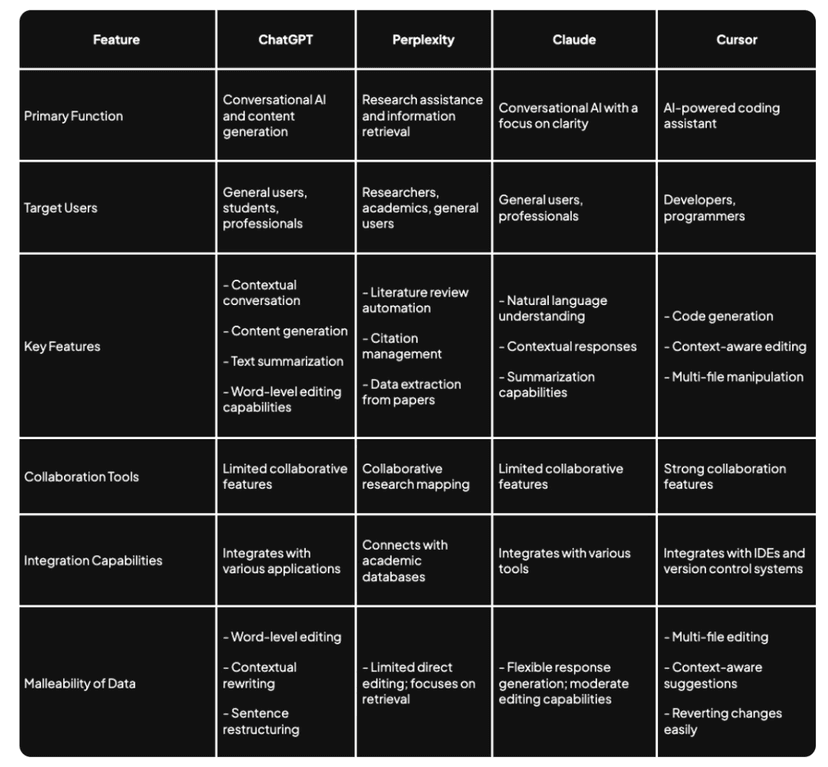
1. AI-Powered Conversational Agents
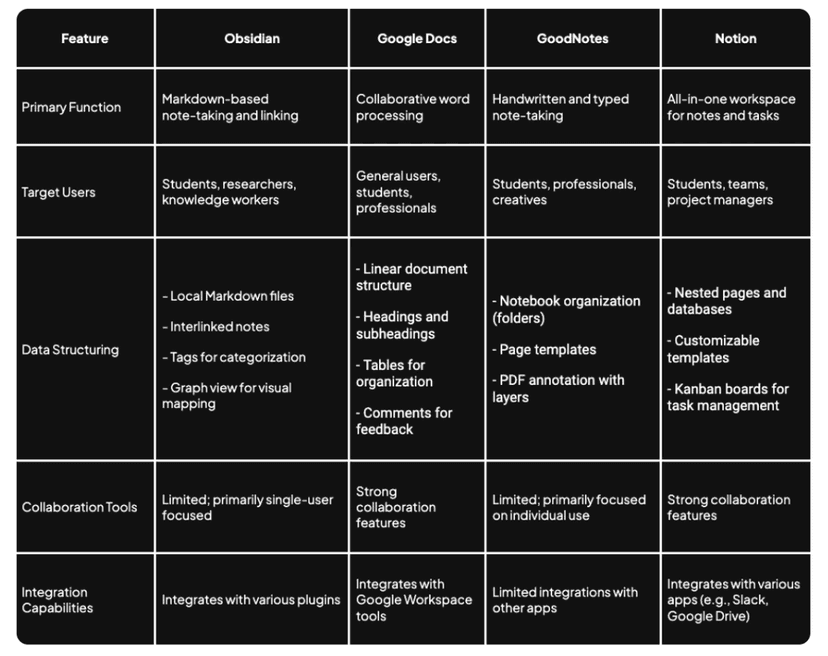
2. Note-taking Applications
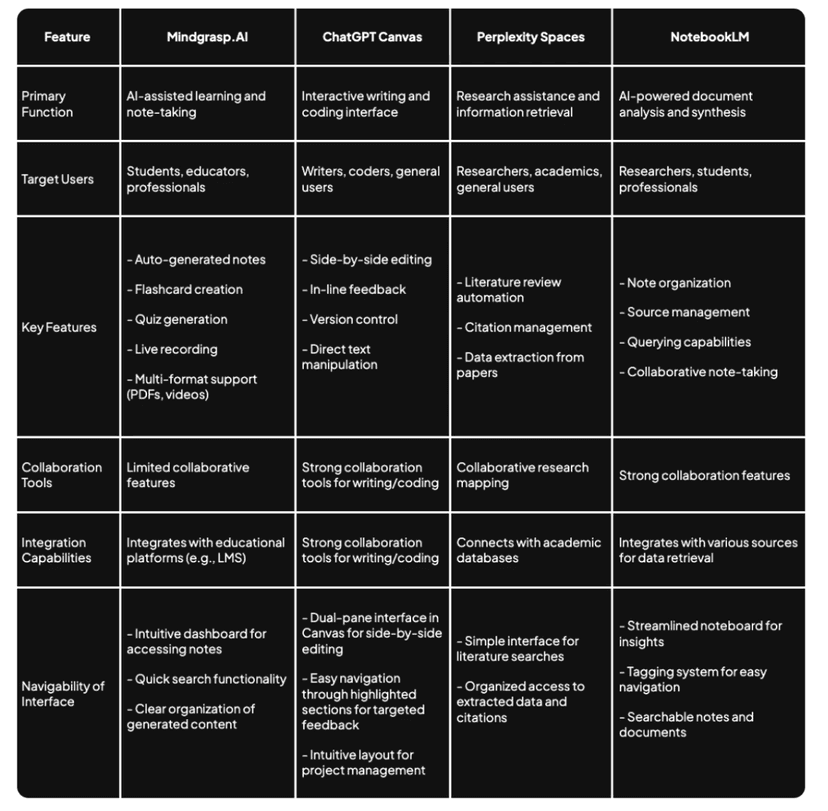
3. AI-Assisted Research Platforms
THE SOLUTION
A word-level, AI-powered note-taking platform that utilizes graph connections to organize content that is designed for students to use while following lectures or class discussions and later while studying for exams.
It is designed to have a seamless, intuitive workflow, prioritizing efficiency, structure, and with features that strictly addresses the target user persona.
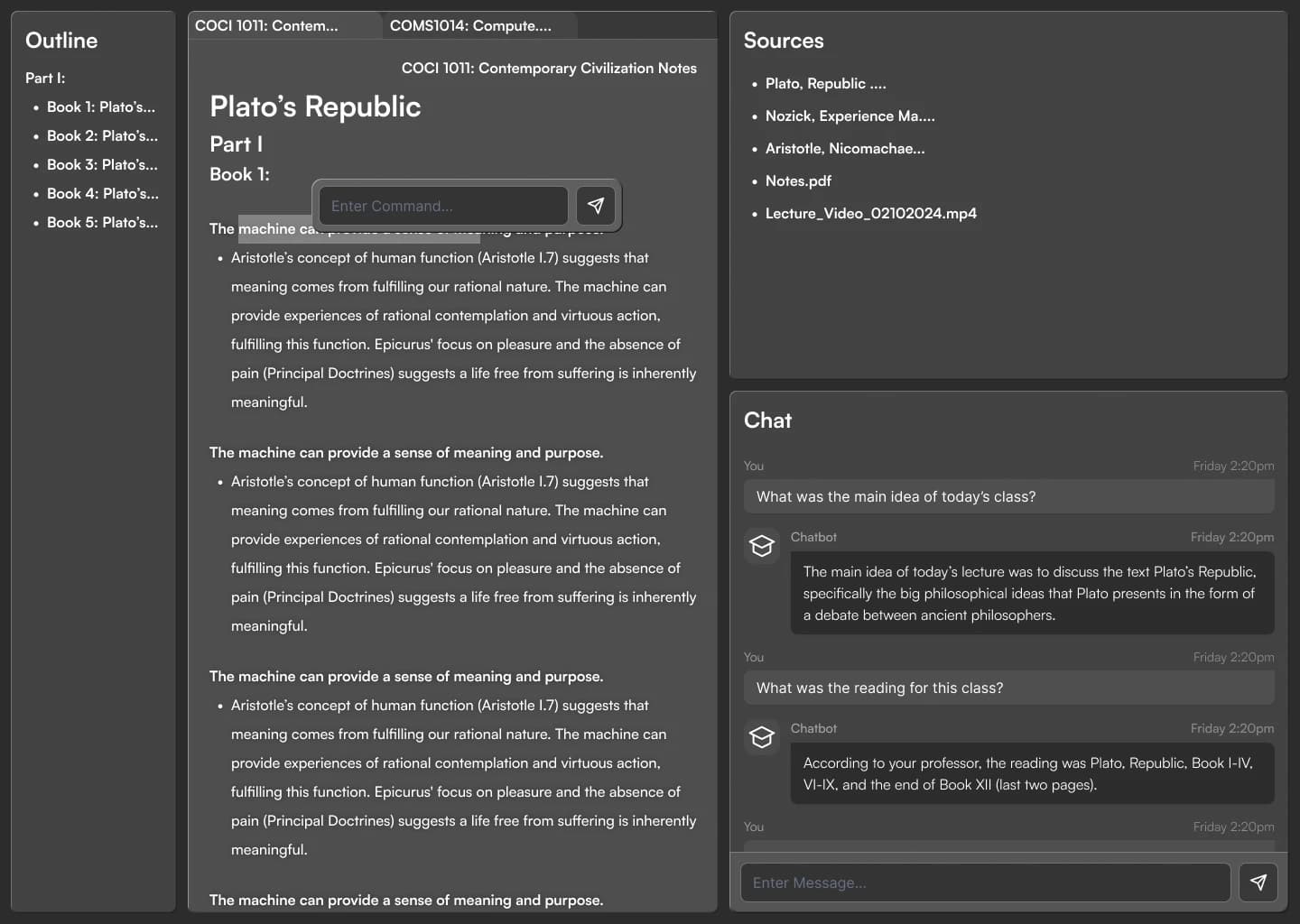
LO-FI DESIGNS
I start off the actual design process with drawing out the possible screens while keeping in mind a general user journey for each of the main functions of the program. I use Figjam to keep track of this process, and come back to make changes to these user flows as I work on the wireframes and mockups later on.
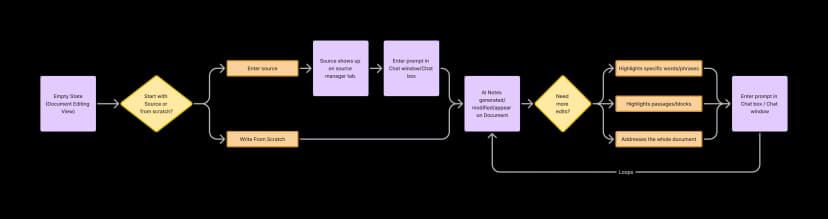
Write Notes Flow
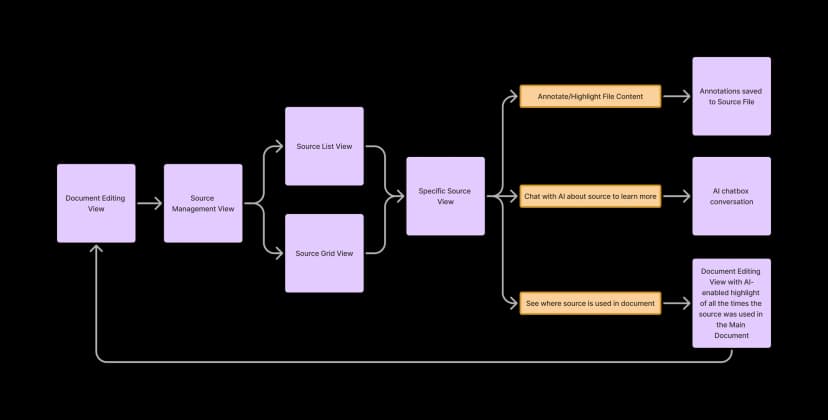
Source Management Flow
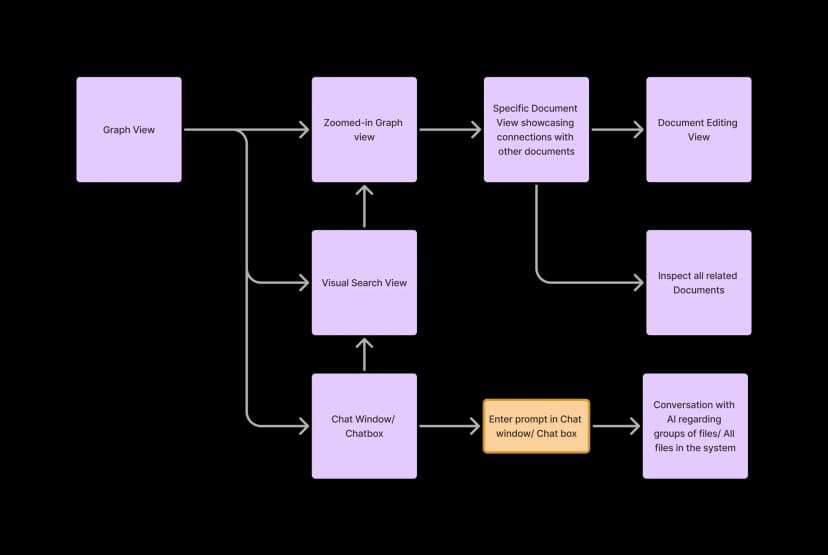
Graph-based Organization Flow
With a more structured idea of how the app should work, I then start drawing out the wireframes and layout of how the app interface should look.
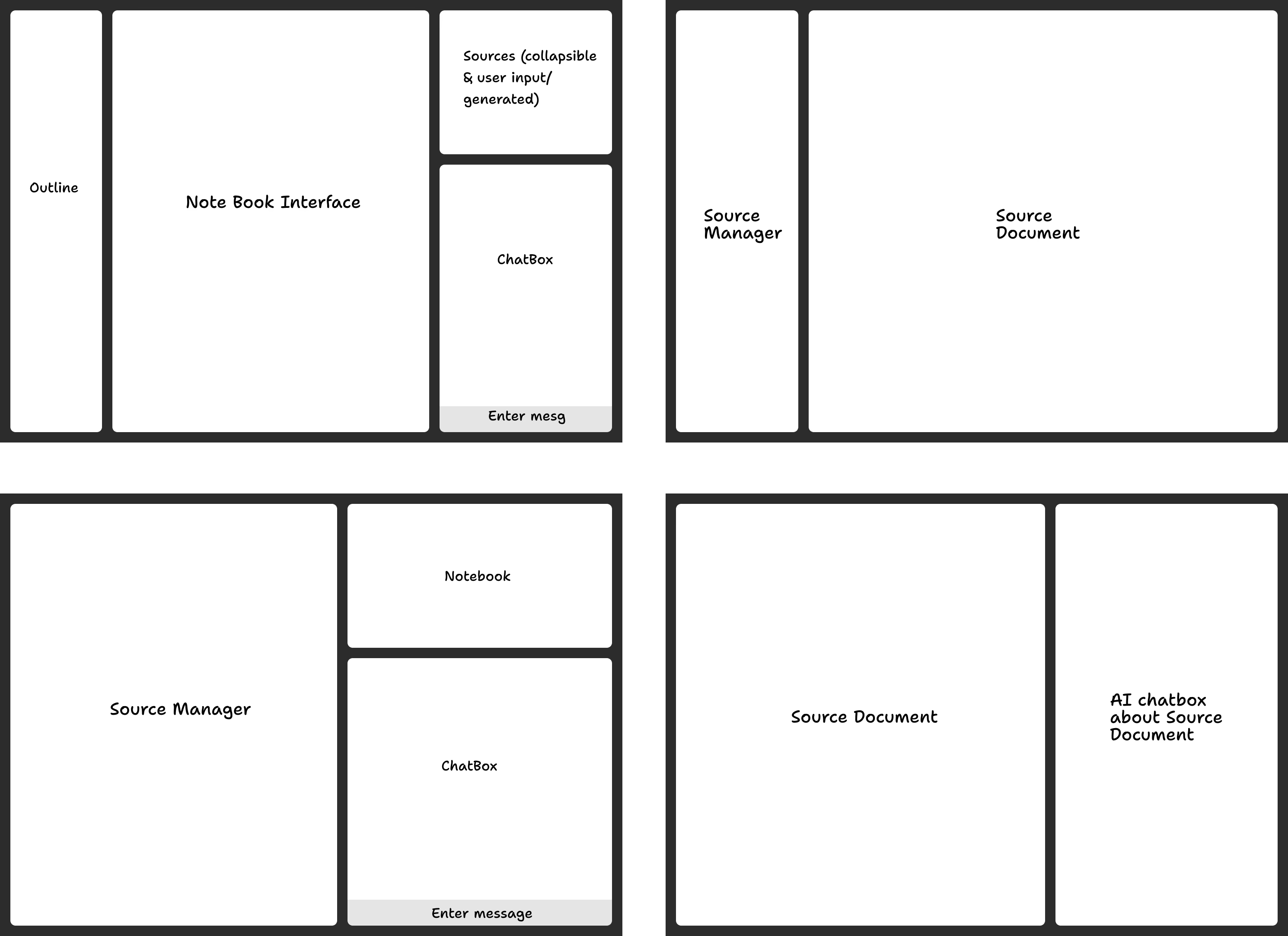
Lo-fi Wireframes
HI-FI DESIGNS
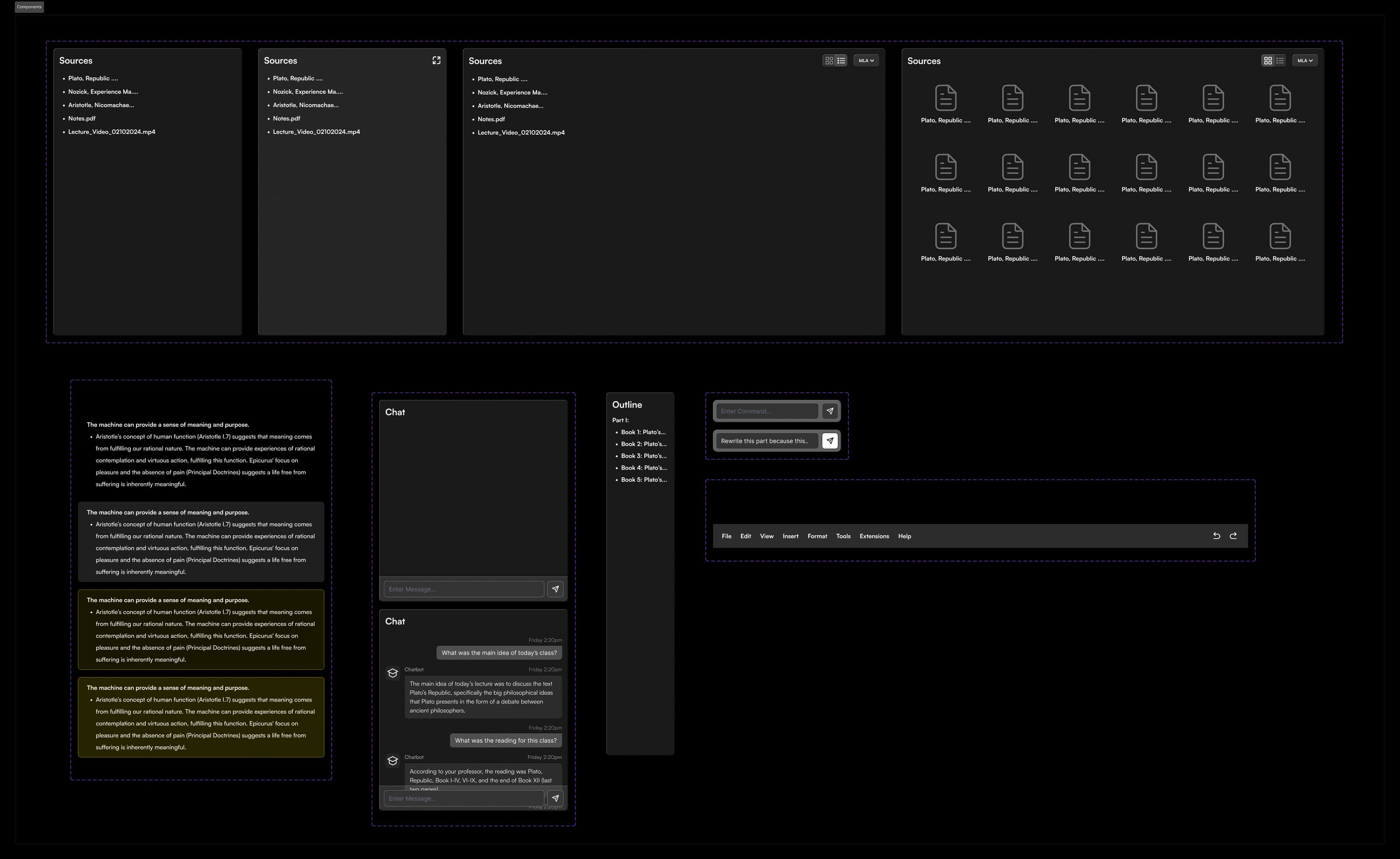
As I worked on the hi-fidelity mock-ups of the platform, I created multi-state components in Figma to ensure consistency and responsiveness across different screen sizes. These components included interactive elements, dynamic layouts, and streamlined navigation, providing a seamless and intuitive user experience. I also added empty states and edge cases for the components to take into account all possible scenarios.
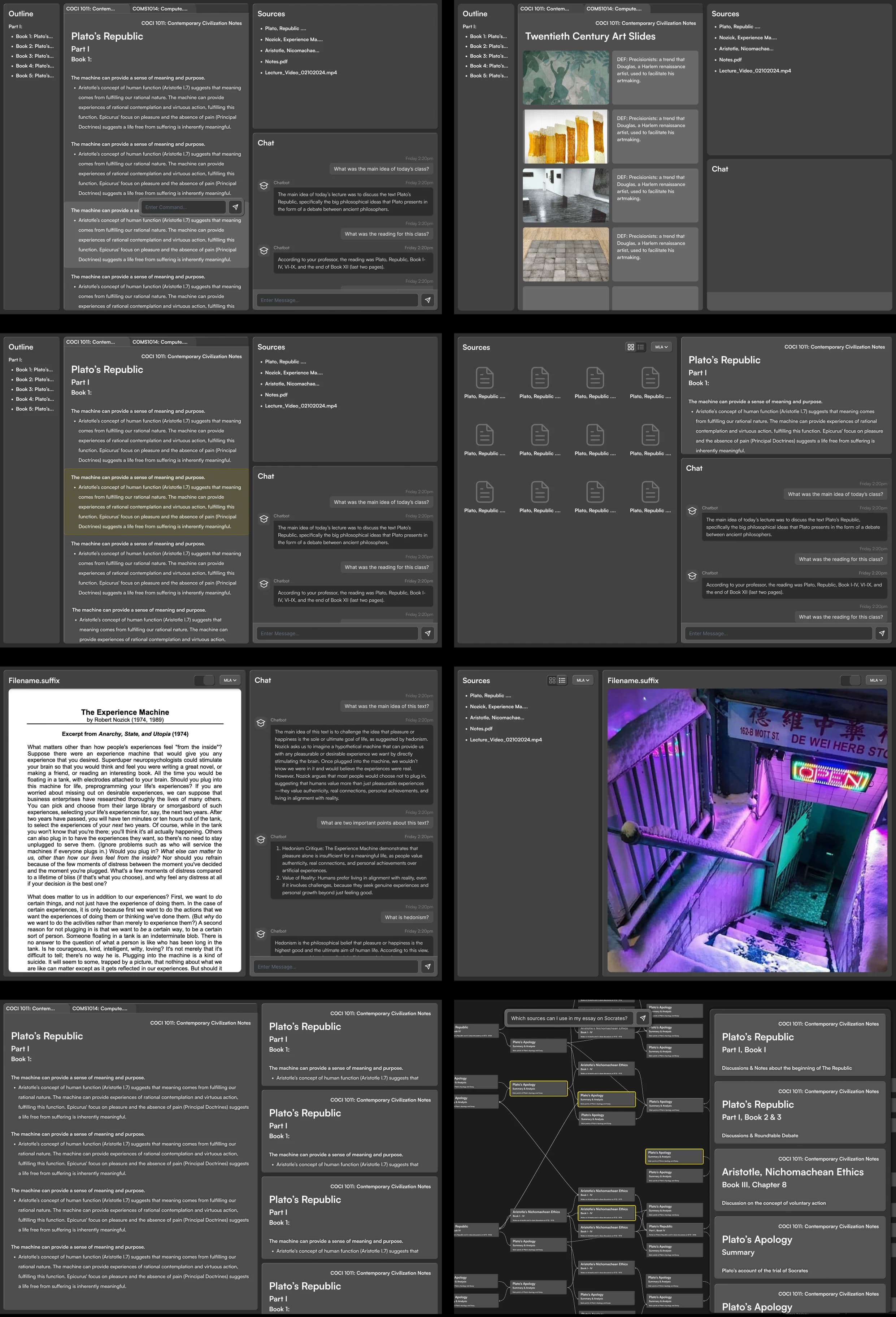
As part of the iterative design process, I meet up with students at Columbia University to discuss further about their workflow, and give them the demo to see if they can navigate through the screens. I start off with lower fidelity wireframes, and end up with final mockups that are presented to these students. This process proved to be very insightful, as I was able to identify many different points of emphasis according to the user's logic, helping me design intuitive and human-centric interfaces.
After 3 rounds of iteration and user testing & listening to user feedback, I came up with the finished MVP design for the program.
FINAL FEATURES
Integrating graph views with AI enhances knowledge management by dynamically uncovering relationships and clustering related ideas.
Graph Navigation
Graph Search
NOTE: As of March 2025, Google's NotebookLM released an “Interactive Mind Map” feature similar to this.
Address individual words, phrases, or bigger sections and chat with AI to modify those specific sections for precise revisions.
Generate initial notes based on provided sources using RAG-augmented LLM, ensuring accurate and contextually relevant information.
CONCLUSIONS
Through this project, I wanted to bring my UX skills to the test. I analyzed current products in the market, and identify the specific needs and pain points of students who are using these programs, in order to create and design a product that would provide the most optimal workflow for students who wants to take notes and genuinely learn the materials taught at school.
Integrated features from multiple tools into one cohesive platform
Prioritized intuitive interface design for improved user focus
Implemented AI-driven insights to personalize the learning experience
LLMs can significantly enhance content understanding and retention
Balancing AI assistance with active learning is crucial
Don't like my portfolio? Let me know at btt2118@columbia.edu